
Xenon Connect · Wirral

Xenon Connect log-in and help for our clients
Log in to Xenon Connect, the software that checks your bookkeeping data for errors, and find its help guides here. We're accountants in Bromborough, Wirral, working with clients across the UK.
Already a client?
Help guides and remote support
Find Xenon Connect's Help Centre, its introduction video and our remote support below.
Client links
Where do you log in to Xenon Connect and get help?
Use the links below. Log in on Xenon Connect's own sign-in page and choose the business owner or client option.
For guides, go to the Xenon Connect Help Centre. If something isn't working and you'd like us to look at your screen, start a remote support session with us.
Log in to Xenon Connect
Go to Xenon Connect's sign-in page and choose "Business Owner or Client".
Log in to Xenon Connect
Xenon Connect Help Centre
Guides from Xenon Connect, from the set-up wizard to each bookkeeping check.
Open the Help Centre
Introduction video
"An Introduction to Xenon Connect", from Xenon Connect on YouTube.
Watch the introduction on YouTube
Remote support from us
Install our remote assistance tool, give us the session code and we can help on your screen, 9am to 5pm, Monday to Friday.
Start remote support (SOS)
What it does
What does Xenon Connect do?
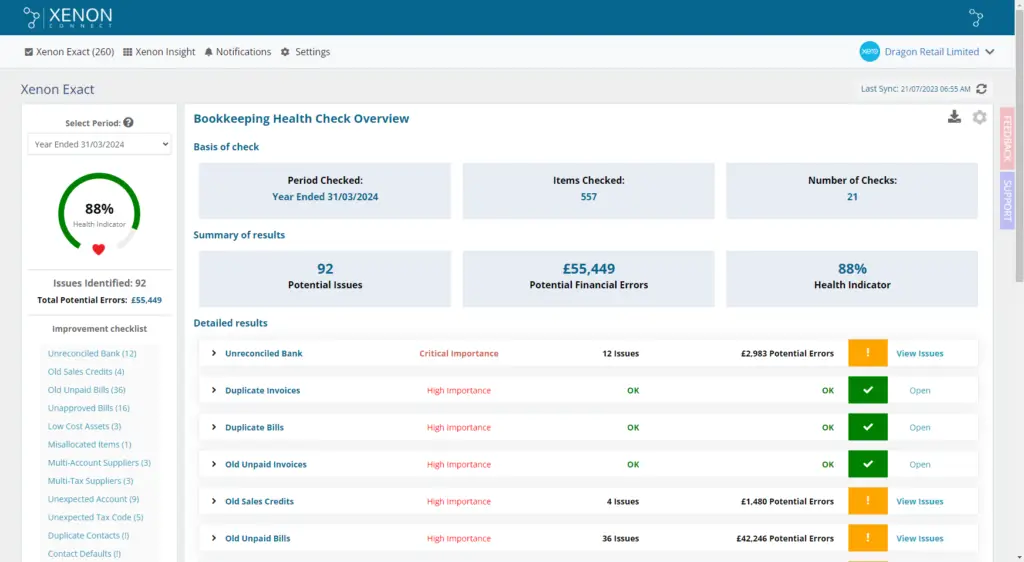
Xenon Connect is cloud software that checks the bookkeeping data in your accounting software for errors and explains how to fix each one. It also shows key figures such as sales, cash and profitability, and sends alerts.
Xenon Connect says its software is made by UK chartered accountants.
Bookkeeping health check
Looks for items such as unreconciled bank transactions, duplicate invoices and bills, old unpaid invoices and unexpected tax codes, and gives your bookkeeping a health score.
Financial insights
Key figures including a sales tracker, a cash health check and profitability, so you can see how the business is doing.
Alerts
Notifications when you hit your monthly sales target, when your year end is coming up and, if you're not VAT registered, when your taxable sales near or pass the VAT registration threshold.
Features as described by Xenon Connect on its own website.
Works with your software
Xenon Connect connects to QuickBooks Online, Xero and FreeAgent, the software we work in, and brings your bookkeeping data in automatically every night.
Questions
What do clients ask us about Xenon Connect?
How do I log in to Xenon Connect?
Go to Xenon Connect's sign-in page, choose "Business Owner or Client" and enter your email address and password. Xenon Connect requires two-factor authentication for every user, so you'll also need a code from an authenticator app or by email.
I've forgotten my Xenon Connect password. What should I do?
Use the reset password option on Xenon Connect's sign-in page. Enter your email address and Xenon Connect will send you instructions to reset it. If you're still stuck, get in touch with us.
Where can I get help using Xenon Connect?
In Xenon Connect's Help Centre, or from the Support tab on the right of every page once you're logged in. For questions about your bookkeeping or accounts, call us on 0151 334 5935 or message us on WhatsApp.
Which accounting software does Xenon Connect work with?
QuickBooks Online, Xero and FreeAgent, the three packages we work in. Xenon Connect connects to your software and brings your bookkeeping data in automatically every night.
Is my data safe in Xenon Connect?
Xenon Connect says its data is hosted in London on Amazon Web Services, encrypted in transit and at rest, and that two-factor authentication is required for every user. Its data security summary gives the details.
Do I need to be on the Wirral?
No. We're based in Bromborough and work with clients across the UK by phone, Zoom, WhatsApp and our client app.
Need a hand?
Questions about your bookkeeping?
Get in touch with your accountant in Bromborough. Support is available 9am to 5pm, Monday to Friday.